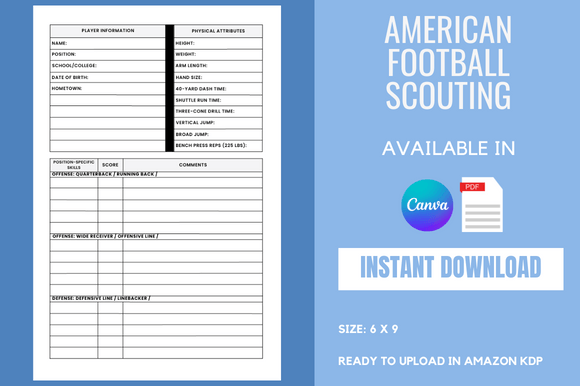
American Football Scouting KDP Interior
If you are exploring the low-content or no-content publishing space on Amazon KDP, you have likely come across the idea of using ready-made interiors to speed up production. One niche that continues to perform well is sports-related content, particularly resources for coaches, analysts, and dedicated fans. The American Football Scouting KDP Interior is a product designed for exactly this purpose — a pre-formatted notebook interior that allows you to publish a scouting-focused journal or workbook without starting from a blank page. But like any tool in the print-on-demand space, how you use it matters far more than simply having it.
Many sellers jump into this with enthusiasm, only to run into problems that could have been avoided with a little forethought. The interior itself is built in Canva, which means it is customizable and user-friendly. However, the difference between a product that sells and one that collects dust often comes down to the small decisions you make before hitting publish. Let’s walk through the common mistakes people make with this type of interior, and more importantly, how to steer around them.
Mistake One: Ignoring the Bleed Setting
This is probably the most overlooked detail among beginners. The American Football Scouting KDP Interior comes with a bleed setting already applied, which is good news. But many users still manage to mess this up when they start editing. Bleed is the extra space around the edges of your pages that gets trimmed off during printing. If you accidentally disable it or move elements outside the safe zone, your final book can end up with white borders or cut-off content.
To avoid this, always check that your Canva document dimensions match the original specifications before you make any changes. If you resize the document, you risk losing the bleed margins. Keep the 6 x 9 inch size as is, and only edit content within the safe area. If you are unsure, use Canva’s preview tool to see how pages will look after trimming. A small step like this can save you from re-uploading files after a rejection from KDP.
Mistake Two: Over-Customizing or Under-Customizing the Canva Template
There is a fine line between making a product your own and making it unrecognizable. The editable Canva template link included with the interior is meant to give you flexibility, not to encourage a complete redesign. Some sellers add too many graphics, change fonts recklessly, or insert heavy background images that increase file size and make printing expensive or poor quality. On the other hand, some sellers do nothing at all and upload the interior exactly as delivered, which means their book looks identical to dozens of others on the market.
The better approach is to make targeted, thoughtful edits. Update the cover to match the interior theme. Add a short introduction page with your own voice. Maybe adjust the header or footer text to reflect your brand. But keep the core layout — the tables, scouting fields, and note sections — intact because they are proven to work. If you are not a designer, trust the layout that was built for you. Your focus should be on positioning the book for the right audience, not reinventing the wheel.
Mistake Three: Misunderstanding the Target Audience
An American football scouting notebook is not a general journal. It serves a specific purpose for a specific group of people. Coaches at the high school and college level, player evaluators, and even dedicated fantasy football analysts use these types of notebooks to record observations. If you market it as just another lined journal, you will attract the wrong buyers and get poor reviews.
Before you upload, think about who actually needs this format. A high school coach tracking opponent tendencies. A scout evaluating prospects at a combine. A parent documenting their child’s progress through a season. Each of these users has slightly different needs, but they all benefit from structured pages that guide their note-taking. When you write your product description, speak directly to these users. Mention specific use cases like “tracking defensive formations” or “recording quarterback mechanics.” The interior is built for this, so make sure your marketing reflects that specificity.
Mistake Four: Treating It Like a One-Click Solution
It is easy to think that buying a KDP interior means you are done. The file is ready to upload after all. But the reality is that publishing through KDP still requires effort on your part. You need to design a front and back cover that matches the interior’s size and style. You need to write a compelling product description with relevant keywords. You need to set a competitive price and decide whether to enroll in KDP Select.
The interior saves you hours of formatting work, but it does not sell itself. People who treat it as a shortcut to passive income are often disappointed. Instead, treat it as a head start. Use the time you saved from not having to build a notebook from scratch to focus on marketing, cover design, and listing optimization. That is where the real return comes from.
Mistake Five: Not Testing the Print Quality Before Going Live
Digital previews are useful, but they do not tell you everything. Colors can shift. Margins can look different on paper. Text that seems clear on screen might feel too small in a printed book. The American Football Scouting KDP Interior is designed to print well, but every file behaves differently depending on how you edited it.
Order a proof copy before you publish. It costs a few dollars, but it can save you from negative reviews and returns. Check that the scouting fields are large enough to write in. Make sure the paper does not bleed through if someone uses a pen. Verify that the headers and page numbers appear correctly. If you made customizations, this step is especially important. A proof copy gives you confidence that your book looks professional when it reaches the customer.
Mistake Six: Overlooking File Size and Compression
Editable Canva templates can sometimes produce large PDF files, especially if you add images or high-resolution elements. KDP has file size limits, and large files take longer to upload and may cause processing errors. More importantly, oversized files can affect the printing cost and your royalty margin.
Before uploading, compress your PDF without sacrificing readability. Canva allows you to adjust quality settings when downloading. Use a standard compression level that keeps text sharp but reduces image resolution. The interior already has a clean layout, so you do not need heavy graphics to make it appealing. A lean file uploads faster, processes smoothly, and keeps your production costs low.
Mistake Seven: Ignoring the Competition and Pricing
The low-content book market is crowded. A quick search will show you dozens of football scouting notebooks, many of them using similar interiors. If you price your book too high without a clear reason, buyers will choose a cheaper option. If you price it too low, you devalue your work and reduce your royalties.
Look at what other sellers are charging for notebooks of similar length and purpose. Pay attention to the number of pages (110 pages in this case) and the size (6 x 9 inches). Consider whether your cover design and listing quality justify a slightly higher price point. Sometimes adding a bonus page — like a season summary or a glossary of scouting terms — can differentiate your book and support a premium price. The interior is a foundation, but your strategy around it determines your profit.
Mistake Eight: Not Following KDP Upload Guidelines
KDP has specific requirements for PDF files, including trim size, bleed, and color space. Even a small deviation can result in a rejection or a poorly printed book. The interior file you receive is already set up to meet these standards, but if you alter the document dimensions or color profile during editing, you might break compliance.
Stick to the original setup. If you need to add pages, duplicate existing ones rather than creating new documents. Keep the color mode as CMYK if possible, or use the recommended settings for print-on-demand. And always preview your book using the KDP online previewer before submitting for review. This catches issues that might not be obvious in Canva.
What You Should Check Before Buying or Using This Interior
Before you download or purchase the American Football Scouting KDP Interior, take a moment to verify a few things. First, confirm that the page count — 110 pages — fits your publishing plan. Some sellers prefer 100-page books to keep printing costs lower, while others like a thicker notebook that feels more substantial. Second, make sure you have access to Canva. The editable template link requires a free or Pro account, so you need to be comfortable using that platform. Third, think about your overall product strategy. Are you publishing a single notebook or building a series? If you plan to release multiple sports-related journals, this interior can serve as a template for future books with minor modifications.
Also, consider whether you want to add any unique elements. Some publishers include a table of contents, a personalization page, or a call to action directing readers to leave a review. Small additions like these do not require much time but can improve the user experience and your book’s performance on Amazon.
Final Thoughts on Using This Interior Effectively
The American Football Scouting KDP Interior is a practical tool for anyone serious about publishing in the sports journal niche. It removes the tedious work of formatting tables, setting margins, and aligning text. But it is not a magic button. The sellers who succeed with this product are the ones who treat it as a starting point, not a finish line. They customize thoughtfully, market specifically, and test thoroughly before going live.
If you follow the advice outlined here — respecting the bleed settings, editing with restraint, targeting the right audience, ordering a proof, and pricing competitively — you will save yourself time, money, and frustration. More importantly, you will build a reputation for delivering a quality product that coaches and scouts actually find useful. That is what turns a one-time sale into a repeat customer. And in the low-content business, repeat customers are the real profit driver.
Take the interior, add your own touch, and put it in front of the people who need it. The rest is just execution.