Draw-and-Write-Journal KDP Interior for Creative Publishing
For anyone building a self-publishing business on Amazon KDP, finding versatile, tested templates that actually work across platforms is a constant challenge. The KDP Interior Draw-and-Write-Journal offers a practical solution for creators who want a ready-to-print format without sacrificing design flexibility. This particular interior set moves beyond a basic notebook and gives publishers, educators, and content creators a structured yet open canvas that supports both drawing and writing activities. Whether you are launching your first journal or expanding an existing catalog, understanding what this template includes and how it fits real-world use cases can save time and reduce guesswork.
What Makes a Draw-and-Write-Journal Interior Different
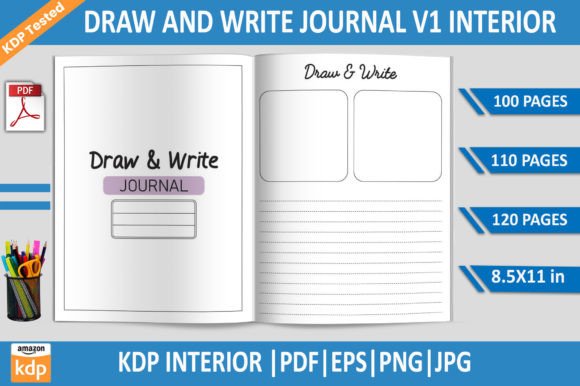
A standard lined journal serves a single purpose. By contrast, a draw-and-write layout combines dedicated space for illustration with guided lines for text. This design supports activities where visual thinking and written expression go together. The template here includes professionally formatted pages at 8.5x11 inches, which is a standard size for print-on-demand and allows generous room for drawing areas alongside lined sections. Because the interior comes in multiple page counts—100, 110, and 120 pages—you can choose the thickness that best matches your intended audience and pricing strategy. This flexibility matters when you are testing different product tiers on KDP or matching customer expectations for a particular age group or use case.
The files are delivered as print-ready PDFs, which means they have been checked against Amazon's upload requirements. No bleed setting is applied, so you do not have to worry about trimming margins or content being cut off. For designers who want to customize further, the inclusion of EPS, PNG, and JPG formats gives you options to edit elements in Adobe Illustrator or other vector software. This combination of ready-to-upload files and editable source files makes the interior suitable whether you plan to use it as-is or adapt the layout for a branded series.
Practical Benefits for Self-Publishers and Content Creators
One of the most time-consuming parts of publishing on KDP is formatting interiors that meet Amazon's specifications. Even small errors with margins, resolution, or page count can lead to rejection or poor print quality. This interior has been tested on Amazon KDP, which reduces the risk of upload issues. The 300 DPI resolution ensures that both the drawing areas and text lines will appear crisp when printed. For someone who publishes multiple titles each month, having a pre-tested template means you can bypass the formatting bottleneck and focus on cover design, marketing, or content development.
The draw-and-write format naturally appeals to parents, teachers, and caregivers looking for engaging activity books. Children benefit from having a clear space to sketch ideas and a separate area to practice writing or storytelling. But the use cases extend well beyond young audiences. Adults who journal for mindfulness often combine sketches with reflections. Entrepreneurs and marketers use draw-and-write formats for brainstorming, mind mapping, or planning visual content. The same layout that works for a child's storybook also supports a professional's creative journaling practice. That versatility is valuable when you want to repurpose a single interior for multiple niches on KDP.
Who Benefits Most from This Template
New publishers entering the KDP space often struggle with formatting details. This interior removes that barrier by providing files that are already set up correctly. Experienced creators who want to expand their catalog quickly will appreciate having multiple page count options and editable source files. Educators and homeschool parents can use the journal for classroom activities or supplemental learning materials. Freelance designers who produce interiors for clients benefit from the EPS format, which allows them to alter colors, add branding elements, or adjust layout proportions without starting from scratch. Bloggers and course creators who sell digital or printed resources can bundle the journal as a bonus or sell it as a standalone product on platforms beyond Amazon.
However, it is also worth considering whether a standard draw-and-write layout fits your specific content strategy. If your audience needs extremely wide writing lines for very young children, or if you require specialized gridded pages for technical drawing, you may want to compare this format with other options. The strength of this interior lies in its balance—it is generic enough to serve many purposes but structured enough to feel intentional.
How the File Formats Support Your Workflow
Having multiple file types may seem like a small detail, but it affects how much control you have over the final product. The PDF files are the easiest to use: you can upload them directly to KDP with no additional editing. If you want to add a watermark, adjust the line spacing, or incorporate your own cover design elements, the EPS files give you vector-based layers that scale cleanly. The PNG files with transparent backgrounds are useful if you are creating digital previews, social media mockups, or sample pages for your book description. JPG files work well for quick proofing or for use in design software that does not support vector formats. Having all these options in one package means you do not need to generate each format separately.
For someone managing a growing list of titles, this reduces friction. You can produce a printed book, a digital download, and promotional assets all from the same source files. That kind of efficiency supports a sustainable publishing workflow, especially if you are working alone or with limited design resources.
Realistic Use Cases and Practical Tips
Here are some ways you can apply this interior to actual products on KDP:
- Children's story journals – Combine the drawing space for illustrations with the lined area for written stories. Parents and teachers use these to encourage literacy and creativity.
- Gratitude or reflection journals – Adults can use the draw section for visual journaling, while the writing area captures thoughts or affirmations. This hybrid approach appeals to customers who want more than just lines.
- Homeschool writing prompts – Pair the journal with a prompt list. The structured layout helps children stay organized while still leaving room for imagination.
- Brainstorming notebooks – Entrepreneurs and freelancers often switch between sketching concepts and writing notes. A dedicated space for each activity keeps ideas clear.
- Classroom activity books – Teachers can create subject-specific journals where students draw scientific observations or historical scenes and then write about them.
When you prepare your KDP listing, highlight the tested quality and the variety of formats. Customers who self-publish appreciate knowing that the interior has already passed Amazon's checks. You can also mention that the 8.5x11 inch size gives ample room for drawing, which differentiates it from smaller journals that feel cramped. Pricing your book based on the selected page count allows you to test different market segments without redesigning the interior from scratch.
Thoughtful Observations on Fit and Limitations
No single template works for every project. If your target audience requires specialized paper types like dot grid, music staff, or calligraphy guides, this draw-and-write format may not be the best fit. Similarly, if you are creating a very short workbook under 80 pages, the 100-page option might feel too long, though you could combine it with other content. The no-bleed setting is standard for many KDP books, but if you prefer full-bleed designs with color backgrounds, you would need to modify the files accordingly. These are not flaws in the template—they are factors to evaluate when deciding whether this interior aligns with your product goals.
The strength of this offering is that it gives you a reliable foundation. Instead of spending hours adjusting margins, testing print proofs, and converting file formats, you can start with something that already works. That foundation lets you iterate faster, test more ideas, and focus your energy on content quality and audience engagement. For anyone serious about building a sustainable self-publishing business on KDP, having access to well-tested, versatile interiors is a practical advantage that pays back the time invested.
Ultimately, the KDP Interior Draw-and-Write-Journal is more than just a set of pages. It is a tool that connects your creative goals with Amazon's technical requirements. Whether you are publishing for children, adults, or professionals, the combination of tested PDFs, editable EPS files, and multiple page counts gives you room to adapt without starting over. That kind of flexibility is what makes a template truly useful in a competitive marketplace.