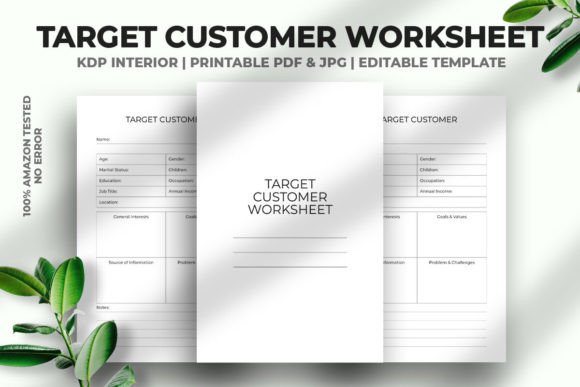
Target Customer Worksheet KDP Interior for Smarter Publishing
Building a successful low-content or no-content book business on Amazon KDP requires more than just a good cover and a handful of keywords. The real challenge is understanding exactly who your buyer is and what they need before you ever hit publish. That is where the Target Customer Worksheet KDP Interior steps in. It is a practical tool designed to help you clarify your audience, refine your product specs, and streamline your publishing workflow.
What Makes This Worksheet Useful for KDP Publishers
This interior is not just another blank template. It is a fully vector editable PDF with a tested format that has already been verified on Amazon KDP for zero errors. The file comes in a standard 6 x 9 inch trim size with 120 pages and no bleed, making it straightforward to upload and print. Because it supports Adobe Illustrator and includes a high-resolution JPG at 300 DPI, you have flexibility whether you prefer working in vector software or need a quick raster preview.
What stands out here is the emphasis on real-world testing. The phrase 100 Tested on Amazon KDP is more than a label. It means someone has already gone through the upload process, checked for margins, spine issues, and formatting glitches, and confirmed the file works. That saves you time and frustration, especially if you are new to the platform or juggling multiple projects.
Core Features That Support Your Workflow
Let us look at what this worksheet actually delivers in terms of structure and usability.
Vector Editable PDF with Adobe Illustrator Support
When you work with a vector file, you can resize elements, change colors, and adjust text without losing quality. This is particularly valuable if you want to customize the worksheet for different niches or branding needs. For example, you might repurpose the same layout for a journal, a notebook, or a diary by simply editing the prompts and headers. The file is also ready to print, so once your edits are done, you can export and upload directly.
Ready-to-Upload Format
The interior comes as a print-ready PDF with no bleed and a 6 x 9 inch page size. That is one of the most popular dimensions on KDP because it works well for both paperbacks and hardcovers. The 120-page count gives you enough room to include multiple worksheet sections without being too thin or too bulky. You can use the space for things like audience profiling exercises, buyer persona outlines, content planning grids, or even simple prompt-based journaling pages if you decide to branch into that format.
High-Resolution JPG Included
Having a 300 DPI JPG alongside the PDF means you can quickly preview the design, share a sample with a client or collaborator, or use it in promotional materials. It is a small addition but one that saves time when you need a visual reference without opening vector software.
Practical Applications Across Different Use Cases
This worksheet is not limited to one type of publisher. Here are some realistic scenarios where it adds genuine value.
For Independent Authors and Self-Publishers
If you are writing a series of guided journals or workbooks, knowing your target customer is essential. You can use the worksheet to map out the demographics, pain points, and goals of your ideal reader. Then, tailor your interior prompts, cover design, and marketing copy accordingly. For instance, a fitness journal aimed at busy professionals will look very different from one created for college students. The worksheet helps you make those distinctions early.
For Freelance Designers and Content Creators
When you offer KDP interior design services to clients, a structured worksheet helps you gather requirements faster. Instead of guessing what the client wants, you can walk them through the template and fill in the details together. This reduces back-and-forth emails and helps you deliver a product that aligns with both the client's vision and the end buyer's expectations.
For Educators and Trainers
You might repurpose the worksheet as a teaching tool in a course about self-publishing or audience research. The clean layout and editable format make it easy to customize examples for your students. You can add your own prompts, remove sections that do not apply, or expand the file with additional pages as needed.
For Entrepreneurs and Business Owners
If you are building a brand around low-content books, the worksheet helps you test multiple niches quickly. You can create separate versions for different buyer personas, compare them side by side, and decide which product line to pursue first. The vector format means you can reuse the same design for multiple projects without starting from scratch each time.
Benefits You Can Expect When Using This Interior
Using a structured customer worksheet is not about overcomplicating your process. It is about gaining clarity and saving time in the long run.
- Faster product development. When you know exactly who you are designing for, you spend less time second-guessing layouts, colors, and content. The worksheet forces you to articulate specifics, which leads to more confident decisions.
- Better alignment with market demand. Many publishers create products they personally like rather than what the market actually needs. A target customer exercise shifts your focus to what buyers are searching for and willing to pay for.
- Clean uploads with fewer errors. Since this interior has been tested on KDP, the technical side is already handled. You can concentrate on the content and customer research without worrying about margin issues or bleed settings.
- Reusable across multiple projects. Because the file is vector editable and supports Adobe Illustrator, you can use it as a base template for dozens of different books. Change the wording, adjust the page count, or modify the design elements to suit each new niche.
- Professional presentation. A well-organized worksheet reflects positively on your brand. Whether you use it as a planning tool for yourself or as a deliverable for a client, the clean design supports a polished image.
Practical Considerations When Using the Worksheet
Before you dive in, here are a few observations based on real-world use that can help you get the most out of this interior.
Start with one niche at a time. It is tempting to fill out the worksheet for five different products in one sitting, but you will get better results if you focus on a single audience first. Take time to research their preferences, browsing habits, and common complaints. Then, use that data to complete the worksheet thoroughly.
Pair it with keyword research. The worksheet helps you define your audience, but you still need to validate demand. Use tools like Publisher Rocket, Helium 10, or even Amazon's own search bar to confirm that people are actually searching for the topics you plan to cover. Combine the qualitative insights from the worksheet with quantitative data from keyword tools.
Edit with purpose. Since the PDF is vector editable in Adobe Illustrator, you can change fonts, colors, and sizes. But avoid making unnecessary changes just because you can. Keep the layout simple and functional. Overcomplicating the design can defeat the purpose of having a clean, tested template.
Consider print and digital use. While the interior is designed for print, the 6 x 9 inch format also works well for digital downloads if you decide to offer a PDF version on your own site or through a platform like Gumroad. Just keep in mind that the no-bleed setting makes it straightforward for both print and screen use.
Test a sample before full production. Even though the file is verified on KDP, it is still a good idea to upload a sample and review the previewer before you publish. This confirms that your edits have not introduced any formatting issues and that the final product looks exactly as you intend.
Observations from Experience
Having worked on branding and product development for over a decade, I have seen how easily a good idea can get lost in poor execution. The difference between a product that sells and one that sits is often rooted in how well the creator understood their buyer. A worksheet like this is not a magic solution, but it is a solid starting point for doing that work intentionally.
The team behind this template comes from a professional creative background, and that shows in the attention to detail. The file is clean, the specs are practical, and the testing on Amazon KDP removes a layer of uncertainty. If you are looking to grow your low-content publishing business with less guesswork and more structure, this interior is worth integrating into your workflow.
Ultimately, the value of any tool depends on how you use it. Spend time with the worksheet, fill it out honestly, and revisit it as your product line evolves. That practice alone will set you apart from publishers who skip the planning phase and wonder why their books do not connect with readers.