Password Tracker Printable Template
Imagine you are setting up a new account for an online tool you need for work. You choose a strong password, jot it down on a sticky note, and stick it to your monitor. Two weeks later, you need to log in again, but the note has vanished. You try three variations of your usual password, none work, and you end up clicking “Forgot password” for the fifth time that month. A simple pad of paper or a note app does not scale once you have a dozen accounts across banking, social media, project management, and email. This is where a Password Tracker Printable Template becomes more than just a sheet of paper — it is a reliable system that lives inside a binder, a planner, or even a folder on your desk.
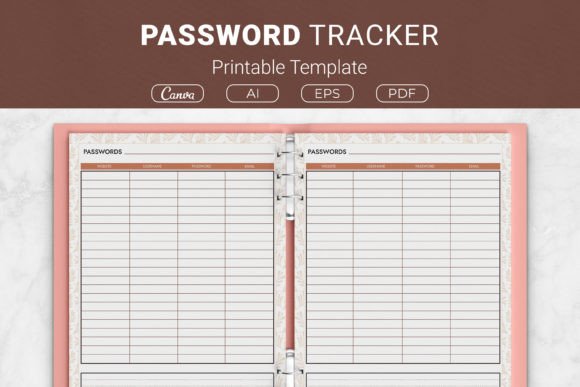
A password tracker printable template is exactly what it sounds like: a pre-formatted document you can print at home and fill in with your account details. It typically includes columns for the website or service name, username, password, email, and sometimes notes or security questions. The versions offered in this package come in multiple sizes — US Letter, A4, 7.5 x 9.25 inches, and 6 x 9 inches — so you can fit them into standard ring binders, travelers’ notebooks, or KDP-ready planners. The files include AI, EPS, and PDF formats, plus a link to a Canva template if you prefer to edit before printing.
Different people care about password trackers for very different reasons. The value is not the same for everyone, and that is exactly why this kind of simple tool works across so many contexts. Let us look at how various audiences might approach this template and what priorities guide their choice.
For Beginners and Non-Technical Users
If you are new to managing passwords or simply prefer a tangible backup, the biggest appeal of a printable password tracker is ease of use. You do not need to install software, sync accounts, or remember a master password for an app. You just open the PDF, hit print, and start writing. Beginners often worry about losing digital data: if a password manager gets hacked or they forget their master password, they are locked out. A printed sheet kept in a safe place provides a physical fallback that does not depend on any device.
For a retiree who uses email and a few online banking accounts, this template is straightforward. They can fill in the website name, their username, and the password they already use. No technical jargon. Cost is also minimal — a sheet of paper and a pen. The availability of multiple sizes means they can choose a format that fits into a small drawer or a larger quick-reference binder.
For Busy Professionals and Small Business Owners
Professionals juggle dozens of logins for software tools, client portals, and team accounts. Reliability and speed matter. A password tracker that is printed and placed on a desk or inside a planner can be accessed instantly, without waiting for an app to load. This is especially useful when you are on a phone call and need to give a colleague a shared account password.
A freelancer might use the template to store credentials for design tools, invoicing platforms, and social media accounts. They can add a column for “security question hint” if they want extra context. The flexibility of the editable Canva template allows them to add rows for notes like “password expires every 90 days” or “two-factor enabled.” Business owners who print the A4 size can keep it in a standard binder alongside other operational checklists.
For a marketing consultant with multiple client accounts, the template becomes a client credential log. They can print one sheet per client and keep them in a binder separated by tabs. This keeps each set of passwords organized without mixing them together. The presentation matters when you need to hand a printed sheet to an assistant — clean lines and proper spacing make the information easy to read at a glance.
For Creators, Educators, and Hobbyists
Creators often run several online platforms: a website, a Patreon page, a mailing list service, an online store, and multiple social channels. A password tracker printable template helps them keep track of who owns which account and what email was used. Educators who manage school portals, parent communication tools, and curriculum subscriptions can also benefit. The learning value for a hobbyist who is just starting to explore online tools is that the act of writing down passwords reinforces memory — some studies suggest handwriting aids recall better than typing.
A hobbyist who runs a small Etsy shop might print the 6×9 inch version and insert it into a discbound planner they already carry. They can update it whenever they change a password. The long-term usefulness here is that the template does not become obsolete when a service updates its interface, as long as the sheet is physically accessible.
For Publishers and KDP Creators
If you are a self-publisher looking for interior content for a low-content or medium-content book on Amazon KDP, this password tracker template works as a ready-made page. The package includes AI and EPS source files, so you can modify the layout, add your own branding, or combine multiple trackers into a password log book. The commercial value is high because you do not need to design from scratch — you can insert the PDF pages directly into your book interior and sell it as a paperback or planner.
Publishers often prioritize quality and file compatibility. The provided PDF files are print-ready, and the AI/EPS files allow full customization. The 7.5 x 9.25 inch size is popular for trim-size notebooks. If you want to offer a password tracker as a freebie to build your email list, the Canva link makes it easy to adjust colors or add your logo.
How to Evaluate Whether This Template Fits Your Needs
Not every password tracker works for every person. Here are some practical ways to decide if this particular template matches your goals, skill level, and project type.
Check the Format You Prefer
If you plan to keep passwords in a specific binder or planner, measure the page size. The set includes US Letter, A4, 7.5×9.25, and 6×9 inches. If your binder uses 7-ring paper or discbound paper, the 7.5×9.25 or 6×9 might fit after punching holes. The PDFs are standard rectangular pages — you can trim or punch them as needed.
Decide on Digital vs. Physical
If you want to edit passwords on a computer and then print, the editable Canva template and AI/EPS files are ideal. If you only want to print and write by hand, the PDF alone is enough. Ease of use tilts toward the PDF for quick printing; flexibility tilts toward the Canva template if you want to add extra columns or change headings.
Think About Security
A printed password tracker is physically vulnerable if left in the open. However, it can be stored in a locked drawer or a safe. For some users, the trade-off between convenience and security is acceptable — especially for low-stakes accounts. For high-stakes accounts like banking, you might use the template only for a subset of logins, or combine it with a digital manager. The template itself can also include reminder fields for “use a password manager” or “check recovery email.”
Consider the Audience of Your Project
If you are creating a KDP planner interior for seniors, the large print and simple table in the 8.5×11 version might be most accessible. If you are putting together a pocket-sized password log for yourself, the 6×9 inch version is portable. For an office team, the A4 size works in ring binders.
Practical Examples for Different Use Cases
Example 1: A remote worker needs to store passwords for VPN, Slack, Asana, Zoom, Google Workspace, and payroll software. They print the US Letter version, write all credentials, and keep the sheet inside a folder labeled “Work Logins” in their home desk drawer. When they change a password, they cross out the old one and write the new one below. They replace the sheet every three months.
Example 2: A hobbyist photographer has accounts for photo editing software, cloud galleries, a client booking platform, and two social media sites. They download the Canva template, remove the “email” column and add a “storage” column to note where backup files are located. They print two copies — one for their home desk and one for their camera bag.
Example 3: A KDP publisher wants to create a 100-page password log book. They open the AI file, duplicate the table page 100 times, adjust margins for the 6×9 trim, and add a cover design. After uploading to KDP, the book sells as a niche tool for small business owners. The publisher benefits from the commercial value of the template without designing from scratch.
Example 4: A small nonprofit team uses the A4 version, prints several sheets, and places them in a shared binder in the office. Each board member has their own row for the donation platform, email marketing tool, and event management system. The collaboration is simple — anyone can check the binder for shared credentials.
What to Look For in Any Password Tracker Template
When evaluating a password tracker, consider these factors:
- Clarity of layout: Do the column headers make sense? Is there a row for each account? The sample given includes website, username, password, and email — that covers most common fields.
- Room to add details: Some people need a notes column. The template can be edited in Canva or Illustrator to add that.
- Paper size compatibility: The four sizes cover the most common global and notebook standards.
- File quality: AI/EPS files allow professional-level editing. PDFs are ready to print with no extra software.
- Cost vs. value: A single printable template is inexpensive compared to a subscription to a password manager or the time lost resetting forgotten passwords.
Is It Right for You?
If you prefer a physical system, need multiple sizes for different binders, want editable source files for commercial use, or simply want a clean, no-fuss table to fill in, this password tracker printable template likely meets your needs. It is not a replacement for a digital password manager if you need auto-fill across devices, but it is a dependable, offline record that does not run on batteries. For beginners, the barrier to use is low — just print and write. For creators and publishers, the source files offer room for customization and resale. And for professionals, the speed of physical reference beats typing into a search bar when you are short on time.
Take a minute to think about your own password habits. Do you find yourself resetting passwords more than once a month? Do you rely on memory alone? If yes, a printed template could save you repeated effort. Download the PDF, insert it into your existing planner, and start organizing your digital life with a simple sheet of paper.